
Hafilat Recharge: Top Up, Check Balance & Manage Your Abu Dhabi Bus Card (2026)
Last Updated: July 3, 2026 | Last Reviewed: July, 2026 | Reading Time: 15 minutes
Quick Answer: Recharge your Hafilat card online at hafilat.darb.ae or via the DARB app using credit/debit card, Apple Pay, or Google Pay. Balance reflects within 2 hours. For instant reflection, use Ticket Vending Machines (TVMs) at bus stations with cash or card. Minimum balance to board: AED 3.
Validating your Hafilat card…
Please don’t close this window
- Checking card details
- Reserving your recharge amount
- Opening TAMM Abu Dhabi portal
Recent recharges
What Is the Hafilat Card?
The Hafilat smart card (حافلات — “buses” in Arabic) is Abu Dhabi’s official contactless travel card for public bus travel. Introduced by AD Mobility (Abu Dhabi Department of Municipalities and Transport) and managed by the Integrated Transport Centre (ITC), it replaces cash payments and paper tickets across Abu Dhabi’s public bus network.
Coverage includes:
- City buses within Abu Dhabi City
- Regional buses connecting Abu Dhabi, Al Ain, and Al Dhafra
- Express/intercity services
- Abu Dhabi Link (on-demand bus service)
Key Statistics:
- 200,000+ daily passengers
- Accepted at 500+ bus stops and all bus stations
- Free travel for children aged 10 and below
The card stores your balance electronically and automatically calculates fares based on distance traveled — you simply tap in when boarding and tap out when exiting.
My Experience: As someone who commutes daily from Al Reem Island to Khalifa City, I’ve used the Hafilat system since 2019. The 2024 fare overhaul made my monthly commute cost drop from ~AED 120 to AED 95 with the Monthly Pass — a real, measurable saving.
Types of Hafilat Cards: Which One Is Right for You?
Choosing the right card type saves money and protects your balance. Here’s the complete, verified comparison:
| Card Type | Cost (AED) | Validity | Best For | Key Benefits |
|---|---|---|---|---|
| Anonymous Permanent Card | 10 | 5 years | Tourists, occasional visitors | No registration required; instant use |
| Personalized Card | Free | 16 years | Residents, regular commuters | Balance transfer if lost; linked to Emirates ID |
| Student Card | Free | 16 years | School & university students | Free or heavily subsidized travel; annual pass at AED 500 |
| Senior Card (55+) | Free | 16 years | Senior citizens | Free unlimited annual pass |
| People of Determination Card | Free | 16 years | People with disabilities | Free unlimited annual pass + one companion |
| Corporate Card | Varies | Varies | Companies with bulk employee transport | Bulk recharge; centralized billing; custom limits |
💡 Recommendation: If you’re a resident or regular commuter, always choose the Personalized Card. It’s free, protects your balance, and unlocks subsidized passes. Anonymous cards cannot recover lost balances.
How to Apply for a Personalized Hafilat Card
Required Documents:
- Emirates ID (residents) or passport + visa (visitors)
- Recent personal photo (can be taken at service centers)
Where to Get It:
- Customer Happiness Centers at major bus stations
- Zayed International Airport Office (open 24/7)
- Online:hafilat.darb.ae — apply online, then collect at nearest center with application receipt
Processing Time: Immediate at centers; 24–48 hours for online applications
Complete Hafilat Fare System & Transfer Rules (2024–2026)
In February 2024, AD Mobility introduced the “Standard Service” — a unified fare system that simplified pricing across city and suburban routes.
Standard Service Fare Structure
| Service Type | Base Fare | Per KM Charge | Maximum Cap |
|---|---|---|---|
| City Bus (Standard Service) | AED 2 | 5 fils/km | AED 5 per journey |
| Regional Bus | AED 2 | 5 fils/km | AED 5 per journey |
| Express/Intercity | AED 2 | 10 fils/km | AED 5 per journey |
| Airport Routes | AED 2 | 5 fils/km | AED 5 per journey |
Minimum Balance to Board:AED 3 (official ITC requirement)
⚠️ Important: Some sources incorrectly state AED 10 minimum — this is wrong. The official minimum is AED 3.
Free Transfer Rules (Money-Saving Feature)
| Transfer Rule | Details |
|---|---|
| Transfer Window | Within 60 minutes of last tap-out |
| Maximum Transfers | 2 transfers using 3 buses total |
| Direction Rule | Cannot transfer in the opposite direction |
| Fee | No additional AED 2 boarding fee for transfers |
Example: You board Bus A at 8:00 AM, tap out at 8:30 AM. You board Bus B at 8:45 AM — no extra AED 2 fee. Total fare calculated from first boarding to final destination.
💡 Pro Tip: Always tap out when exiting, even during transfers. Failure to tap out charges the maximum route fare on your next use.
T-Purse vs. Pass: Which Saves More Money?
| Travel Pattern | Best Option | Estimated Monthly Cost |
|---|---|---|
| 1–2 trips/week | T-Purse (pay-per-ride) | AED 16–40 |
| 3–4 trips/week | T-Purse or Weekly Pass | AED 48–120 |
| 5+ trips/week | Monthly Pass | AED 95 (unlimited) |
| Daily commuter | Monthly or Annual Pass | AED 95/month or AED 500/year |
How to Recharge Your Hafilat Card Online (All Methods)
Online recharge is the most convenient option. Balance typically reflects within 2 hours for web/app recharges, or instantly for TVMs and service centers.
Method 1: Official Hafilat Website (hafilat.darb.ae)
Best For: Desktop users, checking balance + history, managing multiple cards
Step-by-Step:
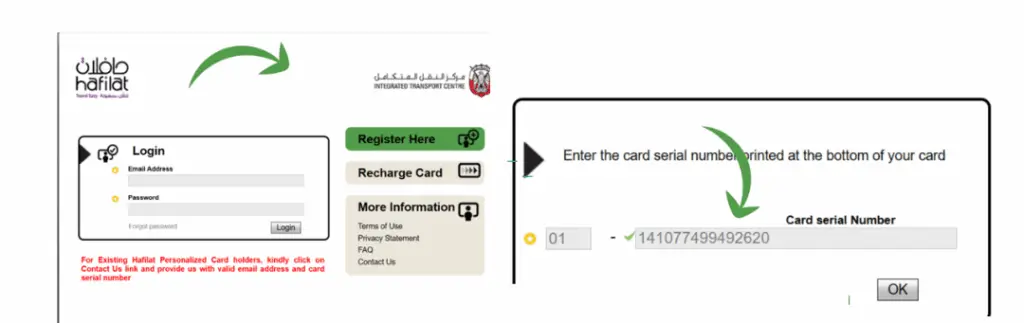
- Visit hafilat.darb.ae
- Click “Recharge Card” (no login required for basic recharge)
- Enter your 16-digit Hafilat card serial number (found on the back of your card)
- Select recharge amount: AED 20, 50, 100, or 150
- Choose payment method: Credit/Debit card, Apple Pay, or Google Pay
- Complete payment and save your transaction reference
- Balance updates within 2 hours
✅ Pros: No app download needed, works on all devices, view trip history
❌ Cons: 2-hour delay for balance reflection
Method 2: DARB Mobile App (Recommended)
Best For: Daily commuters, real-time bus tracking, pass management
Step-by-Step:
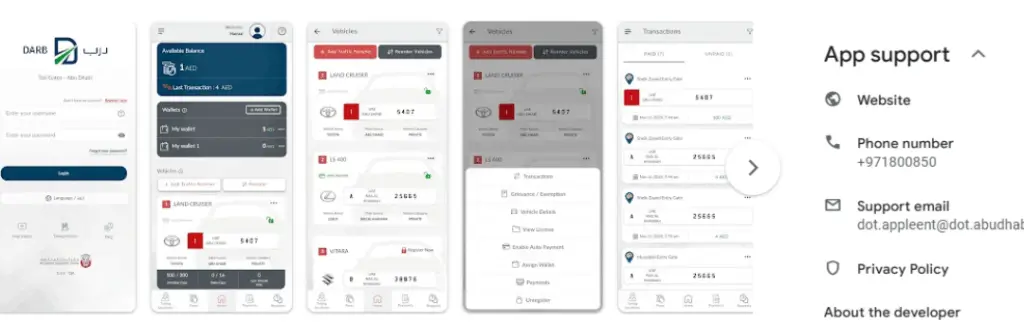
- Download the DARB app:
- Sign up or log in (UAE PASS or email/phone)
- Tap the red plus (+) icon → Select “Recharge Hafilat Card”
- Enter your card number and recharge amount
- Confirm payment via saved card, Apple Pay, or Google Pay
- Receive instant notification when processed
Additional Features:
- Real-time bus tracking
- Route planning
- Pass purchase and renewal
- Fine checking and payment
- Balance alerts
✅ Pros: All-in-one transport app, instant notifications, auto-recharge setup
❌ Cons: Requires app installation
Method 3: Payit Mobile Wallet (FAB)
Best For: Payit users, cashback seekers, wallet-based payments
Step-by-Step:
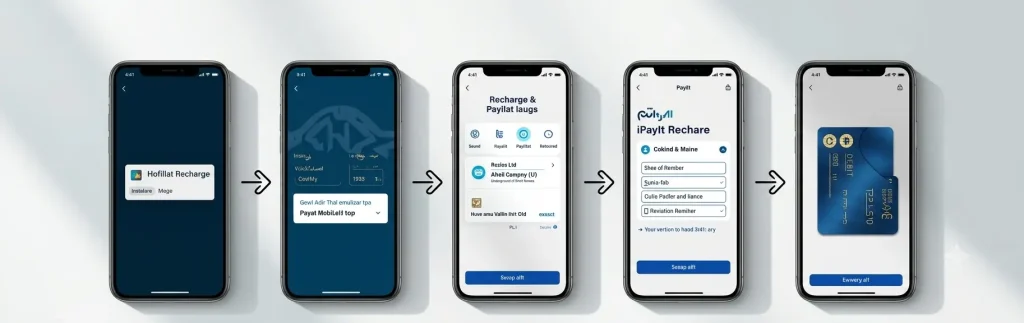
- Open the Payit app (powered by First Abu Dhabi Bank)
- Navigate to “Bills & Transport Services”
- Select “Hafilat Recharge”
- Enter your card number (save for future quick access)
- Select recharge amount
- Pay via wallet balance or linked bank card
Special Perks: Occasional cashback promotions and discount offers for frequent users
✅ Pros: Cashback opportunities, quick re-save feature
❌ Cons: Requires Payit account; balance reflects in 2 hours
Method 4: Auto-Recharge / Smart Top-Up (2026 Feature)
The DARB app now supports auto-recharge for personalized cards:
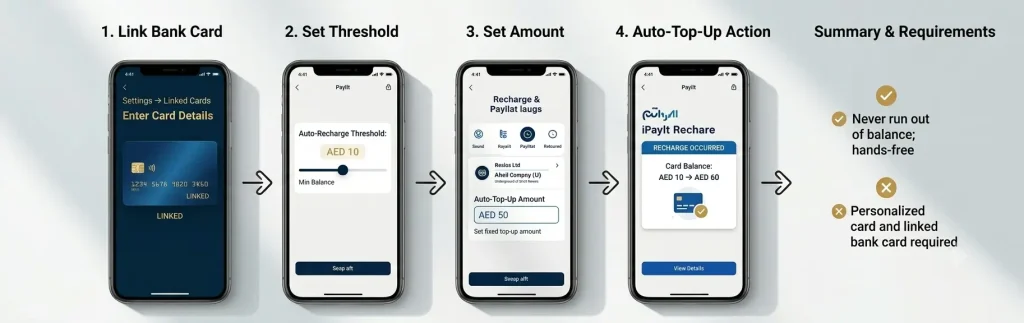
- Link your bank card in DARB app settings
- Set minimum balance threshold (e.g., AED 10)
- Set auto-recharge amount (e.g., AED 50)
- When balance drops below threshold, automatic top-up occurs
✅ Pros: Never run out of balance; hands-free management
❌ Cons: Requires linked bank card and personalized card
How to Recharge Your Hafilat Card Offline
For cash payments or immediate balance reflection, use these offline methods:
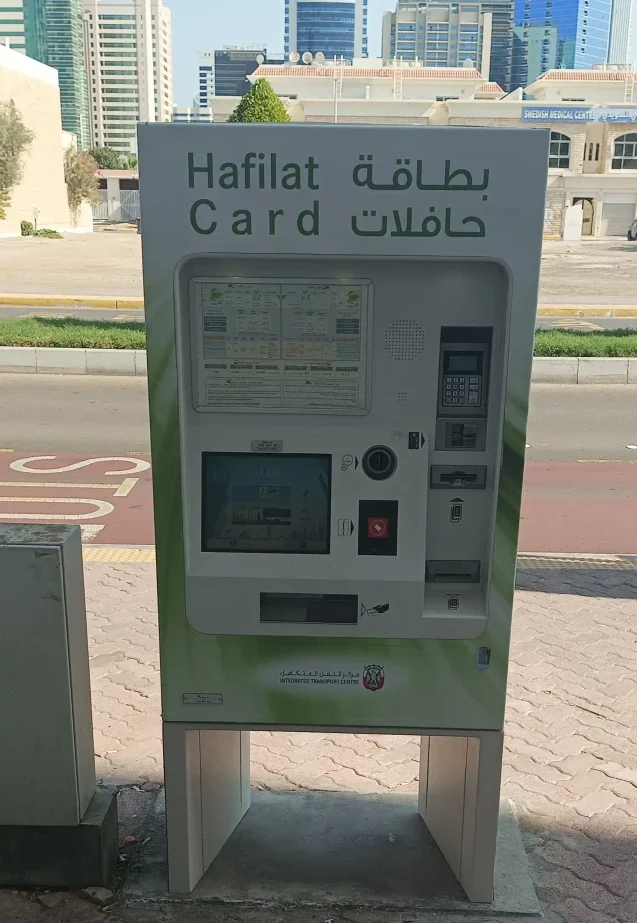
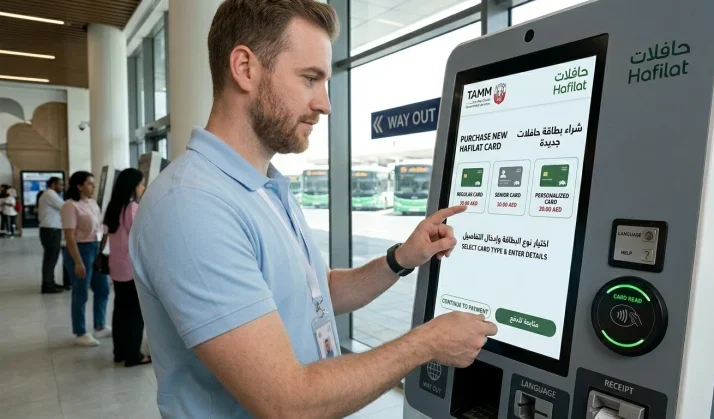
Method 1: Ticket Vending Machines (TVMs)
Locations: All bus stations, major bus stops, shopping malls, Zayed International Airport
Process:
- Insert your Hafilat card into the machine
- Select your preferred language (Arabic/English)
- Choose recharge amount
- Pay with cash or card
- Collect receipt
- Balance updates instantly
✅ Pros: Instant balance, cash accepted, available 24/7 at major locations
❌ Cons: Limited to AED 150 max per transaction
Method 2: Customer Happiness Centers
Locations: Major bus stations across Abu Dhabi, Al Ain, and Al Dhafra
Process:
- Present your Hafilat card and Emirates ID
- Specify recharge amount
- Staff processes recharge immediately
- Receive updated balance confirmation
Operating Hours: Saturday–Thursday, 7:00 AM – 8:00 PM
Method 3: MBME Recharge Machines
Locations: Commercial buildings, shopping centers, select retail outlets
Process: Same as TVMs, but balance reflects after 2 hours
✅ Pros: Widespread locations in commercial areas
❌ Cons: 2-hour delay for balance update
Method 4: Authorized Retail Outlets
Look For: Stores displaying the Hafilat or ITC sticker
Common Locations:
- Supermarkets (Lulu, Carrefour select locations)
- Grocery stores
- Exchange centers
✅ Pros: Recharge while shopping; no extra trip
❌ Cons: Not all locations offer this; verify before relying
Hafilat Passes: Weekly, Monthly & Annual — Cost-Benefit Analysis
For regular commuters, passes offer significant savings over pay-per-ride.
| Pass Type | Duration | Price (AED) | Best For | Break-Even Point |
|---|---|---|---|---|
| Weekly Pass | 7 days | 35 | Short-term intensive use | 7+ trips/week |
| Monthly Pass | 30 days | 95 | Daily commuters | 19+ trips/month |
| Annual Pass | 365 days | 500 | Long-term residents | 5+ trips/week |
| Student Annual Pass | 365 days | 500 | Students | Immediate (subsidized) |
| Senior Annual Pass | 365 days | Free | Seniors 55+ | Immediate |
| People of Determination Pass | 365 days | Free | Eligible residents | Immediate |
💡 Money-Saving Insight: If you take 2 round trips per week (4 one-way journeys), a Monthly Pass at AED 95 saves money vs. T-Purse (AED 2 base + distance charges × 16 trips ≈ AED 80–100+). At 3+ round trips weekly, the Monthly Pass is clearly the winner.
How to Purchase & Activate Passes
| Channel | Weekly Pass | Monthly Pass | Annual Pass |
|---|---|---|---|
| DARB App | ✅ | ✅ | ✅ |
| Hafilat Website | ✅ | ✅ | ✅ |
| TVMs | ✅ | ✅ | ❌ |
| Customer Centers | ✅ | ✅ | ✅ |
Activation: Simply tap your card on any bus reader — the pass activates automatically. The 30-day countdown starts from first tap, not purchase date.
Hafilat Fines: Violations, Amounts & How to Check/Pay Them
Hafilat fines are issued by AD Mobility when passengers violate bus travel rules. The minimum fine is AED 200 – 100× the cost of a single bus ride — making compliance critical.
Complete Hafilat Violations & Fine Schedule (2026)
| Violation | Fine (AED) | Additional Penalty |
|---|---|---|
| No card / fare evasion | 200 | Card may be blocked |
| Failure to tap in | 200 | Maximum fare charged |
| Failure to tap out | 200 | Maximum route fare charged |
| Insufficient balance at boarding | 200 | Must recharge before next use |
| Misuse of personalized card | 200–500 | Card suspension possible |
| Smoking on bus | 200 | Immediate removal from bus |
| Eating or drinking on bus | 100 | Warning for first offense |
| Chewing gum on bus/station | 100 | — |
| Damaging bus property | Up to 500 | Criminal charges possible |
| Obstructing bus operations | 200–500 | Police involvement possible |
| Traveling without valid pass | 200 | Must purchase valid pass |
🚨 Critical Warning: The tap-out rule is where most fines occur. If you board, tap in, then forget to tap out, the system charges the maximum possible fare for that route AND flags it as a violation. Always tap both ways.
Checking Fines via DARB Portal (Most Complete)
- Go to hafilat.darb.ae
- Log in with registered email/password
- Navigate to “Pay Fine” or Account Summary
- Review all outstanding fines with violation type, date, route, and amount
- Screenshot or note the fine reference number
💡 Pro Tip: The logged-in portal shows your full violation history, not just recent fines. If your card was blocked during a period of multiple violations, they all appear here.
Checking Fines Without an Account (Anonymous Portal)
If you received a physical fine receipt from a bus inspector:
- Visit hafilat.darb.ae/AnonymousMedia/Fine.aspx
- Enter the barcode number from your receipt
- Click Submit
- View fine details
⚠️ Limitation: If your receipt lacks a barcode (common when cards are system-blocked), you must visit a service center or call 85555.
How to Pay Hafilat Fines
Payment channels & methods
| Channel | Payment Methods | Processing Time |
|---|---|---|
| DARB Portal / App | Credit/Debit Card, Apple Pay | Instant |
| TAMM Platform | Credit/Debit Card | Instant |
| MOI UAE App | Credit/Debit Card | Instant |
| Service Centers | Cash, Card | Immediate |
| Sahl Kiosks | Cash, Card | Immediate |
How to dispute a Hafilat fine
Valid Grounds for Dispute
Dispute process
-
1
Gather evidence — photos, witness statements, trip receipts.
-
2
Contact Hafilat Customer Care at 85555 or email [email protected]
-
3
Submit dispute within 14 days of fine issuance.
-
4
Provide your card number, fine reference, and explanation.
-
5
Await decision — typically 7–14 business days.
Lost, Damaged, or Blocked Cards: What to Do
| Scenario | Action Required | Cost | Balance Recovery |
|---|---|---|---|
| Lost Card | Report immediately via DARB app or call 85555 | AED 25 replacement fee | ✅ Personalized: Yes; ❌ Anonymous: No |
| Damaged Card | Visit service center with card + Emirates ID | AED 25 replacement | ✅ Personalized: Yes |
| Blocked Card | Pay outstanding fines + visit service center | Fine amount only | ✅ After unblocking |
| Expired Card | Visit service center for renewal | Free for personalized | ✅ Balance transfers |
Steps for Lost Card:
- Block immediately via DARB app or by calling 85555
- Visit Customer Happiness Center with Emirates ID
- Request replacement card
- Pay AED 25 fee
- Balance and passes transfer to new card (personalized only)
Special Programs & Discounts
Seniors (55+ Years)
Students
People of Determination
Emirati Families
Hafilat vs. Nol Card: Abu Dhabi vs. Dubai Transport Comparison
| Feature | Hafilat (Abu Dhabi) | Nol (Dubai) |
|---|---|---|
| Emirate | Abu Dhabi | Dubai |
| Authority | AD Mobility / ITC | RTA (Roads & Transport Authority) |
| Base Fare | AED 2.00 | AED 3.00 (Metro) |
| Max Cap | AED 5.00/trip | AED 7.50 (Metro) |
| Free Transfers | 60-minute window | 30-minute window |
| Monthly Pass | AED 95 | AED 350 (Metro) |
| Annual Pass | AED 500 | Not available |
| Mobile App | DARB | RTA Dubai |
| Coverage | Bus + Regional + Al Ain | Metro + Bus + Tram + Water Taxi |
| Tourist Card | AED 10 (Anonymous) | AED 25 (Silver Nol) |
| Balance Validity | 3 months | 5 years |
💡 Verdict: Abu Dhabi residents/visitors need Hafilat. Dubai residents/visitors need Nol. Cross-emirate travelers need both cards — they are not interchangeable.
Website vs. DARB App: Which Recharge Method Is Better?
| Feature | Official Website | DARB Mobile App |
|---|---|---|
| App Download | ❌ Not needed | ✅ Required |
| Device Compatibility | All devices | iOS & Android only |
| Balance Update Speed | 2 hours | 2 hours |
| Real-Time Bus Tracking | ❌ No | ✅ Yes |
| Push Notifications | ❌ No | ✅ Yes |
| Auto-Recharge | ❌ No | ✅ Yes |
| Pass Management | Basic | Full |
| Route Planning | ❌ No | ✅ Yes |
| Fine Checking | Basic | Full |
| Account Required | Optional | Required |
| Best For | Occasional users | Daily commuters |
💡 Recommendation:Daily commuters = DARB App (all-in-one convenience). Occasional users = Website (no install needed).
Pro Tips for Efficient Hafilat Use
- Always tap in AND tap out — missing either costs you the maximum fare plus potential fines
- Check balance before traveling — use the DARB app or website
- Recharge small amounts frequently — balance expires after 3 months of inactivity
- Register your card online — protects balance and enables auto-recharge
- Save your recharge receipt — until balance reflects (especially for online recharges)
- Use the DARB app for route planning — avoid missed buses and optimize transfers
- Consider Monthly Pass if you commute 5+ days/week — pays for itself quickly
- Keep AED 10+ buffer — prevents insufficient balance issues during longer trips
- Monitor for promotions — AD Mobility occasionally offers pass discounts
- Report lost cards immediately — prevents unauthorized use
💡 Custom Tip from Daily Use: I set my DARB app auto-recharge to trigger at AED 15 with a AED 50 top-up. This means I never have to think about balance — the system handles it automatically. For tourists, I recommend loading AED 30–50 and checking balance every 2–3 days via the website.
Troubleshooting Common Hafilat Problems
Balance Not Updating After Recharge
-
1
Wait 2 hours — online recharges have a processing delay.
-
2
Verify you entered the correct 16-digit card number.
-
3
Check your bank statement — was the payment actually deducted?
-
4
If still missing after 2 hours, call 85555 with your transaction reference number.
-
5
If unresolved, visit a Customer Happiness Center with your card and payment proof.
Card Blocked or Rejected on Bus
-
1
Check for outstanding fines via DARB app or website.
-
2
Pay all fines through the app, website, or service center.
-
3
Visit a service center to manually unblock the card.
-
4
If card is physically damaged, request a replacement. AED 25
Lost or Stolen Card
-
1
Block immediately via DARB app or by calling 85555.
Do this immediately — every minute the card is unblocked risks unauthorized use. -
2
Visit a Customer Happiness Center with your Emirates ID.
-
3
Request a replacement card.
-
4
Pay the replacement fee. AED 25
-
5
Balance transfers to new card — personalized cards only.
Anonymous card holders cannot recover their balance if the card is lost.
Forgot to Tap Out
-
1
Check your balance — you’ll see the maximum route fare deducted.
-
2
If this was a first offense, no fine is typically issued — just the max fare.
-
3
If a fine appears, you can dispute it within 14 days if you have evidence (e.g., reader was faulty).
-
4
Set a phone reminder to tap out until it becomes habit.
Frequently Asked Questions (FAQ)
-
Visit hafilat.darb.ae or use the DARB app. Enter your 16-digit card number, select amount (AED 20–150), and pay via credit/debit card, Apple Pay, or Google Pay. Balance updates within 2 hours. For instant reflection, use TVMs or service centers.
-
Online recharges (website, DARB app, Payit) take up to 2 hours to reflect. If not updated after 2 hours: (1) Check your payment confirmation, (2) Verify you entered the correct card number, (3) Contact Hafilat support at 85555 with your transaction reference.
-
Yes. Online recharges work from anywhere with internet access. The DARB app and website are accessible globally. However, offline recharges (TVMs, service centers) are only available within Abu Dhabi emirate.
-
Five methods: (1) Website: hafilat.darb.ae → enter card number, (2) DARB app: real-time balance display, (3) TVMs: insert card for instant balance, (4) On-bus reader: shows balance when tapping, (5) SMS: dial *163# from registered number.
-
Recharged amounts are valid for 3 months from the recharge date. If you don’t tap the card within 3 months, the balance expires and requires reactivation at a service center. Tip: Tap your card on any reader or TVM periodically to keep balance active.
-
Yes. Students get free personalized cards + annual pass at AED 500. Seniors (55+) and People of Determination get completely free cards and free unlimited annual passes. Emirati families in social support programs get subsidized weekly (AED 30) and monthly (AED 80) passes.
-
Offline options include: Ticket Vending Machines (bus stations, malls, airport), Customer Happiness Centers (major bus stations), MBME machines (commercial buildings), and authorized retail outlets (supermarkets, exchange centers with Hafilat/ITC stickers).
-
The system charges the maximum possible fare for that route (up to AED 5) and may flag it as a violation fine (AED 200). Always tap out — even during transfers within the 60-minute free transfer window.
-
First, check your bank statement for the transaction status. If deducted but not reflected: (1) Wait 2 hours for system sync, (2) Check DARB app transaction history, (3) Contact Hafilat support at 85555 or [email protected] with your transaction reference and card number. Refunds typically process within 5–7 business days.
-
Six types: Anonymous (AED 10, 5 years, no registration), Personalized (free, 16 years, balance protection), Student (free, subsidized passes), Senior (free, free annual pass), People of Determination (free, free annual pass + companion), and Corporate (bulk billing for companies).
-
Since February 2024, passengers can transfer between buses within 60 minutes of tapping out without paying an additional AED 2 boarding fee. Maximum 2 transfers (3 buses total). You must tap out and tap in for each bus, and cannot travel in the opposite direction.
-
Yes. The Hafilat card works across all Abu Dhabi public transport, including Abu Dhabi Link on-demand services. Fares follow the same Standard Service structure.
-
No. The Hafilat card is Abu Dhabi-only. For Dubai travel, you need a Nol card. For Sharjah, you need a Sayer card. Cross-emirate travelers should carry multiple cards or use cash where accepted.
-
Contact Hafilat Customer Care at 85555 or email [email protected] within 14 days of the fine. Provide your card number, fine reference, and supporting evidence (photos, receipts, witness statements). Decisions typically take 7–14 business days.
Official Sources & References
This guide is compiled and verified against the following official UAE government sources:
| Source | URL | Last Verified |
|---|---|---|
| AD Mobility (Official) | admobility.gov.ae | July 3, 2026 |
| Hafilat Official Portal | hafilat.darb.ae | July 3, 2026 |
| DARB App (ITC) | darb.ae | July 3, 2026 |
| TAMM Abu Dhabi | tamm.abudhabi | July 3, 2026 |
| MOI UAE | moi.gov.ae | July 3, 2026 |
| UAE Government Portal | u.ae | July 3, 2026 |
| Federal Decree-Law No. 14 of 2024 | Federal National Council | March 2025 |
Verification Note: All fine amounts, pass prices, and card fees were cross-referenced against the official Hafilat portal and AD Mobility announcements as of July 2026. Prices and policies are subject to change. Always verify current rates at hafilat.darb.ae before making financial decisions.
This guide is updated regularly to reflect the latest changes from AD Mobility and the Integrated Transport Centre (ITC). For personalized assistance, contact Hafilat Customer Care at 85555 or visit any Customer Happiness Center.